Can Python and Django be used to build genuinely offline-first applications, and what does that look like in practice?
Python and Django are often associated with web applications, APIs and cloud-hosted platforms, so many developers assume they are a poor fit for offline-first software, but that assumption is wrong. Django is not cloud-dependent by nature, because at its core it is a framework for structuring logic, data and interfaces, and with the right architectural choices it makes a solid foundation for apps that run entirely on a local machine.
This article explains how that works, which patterns support offline-first design in Django, and where the real limits are.
- Django does not need the internet. Its database layer, admin, templates, forms and login system all work on a local machine.
- SQLite is usually the right database for offline-first apps, because everything lives in one file the user can back up.
- Most offline-first failures come from hidden network calls such as CDN files, analytics and remote logins.
- A good offline-first app starts, runs and shuts down without making a single network request.
Reframing Django as a Local Application Framework
Django is usually introduced as a web framework, but that description leaves out most of what it gives you. It comes with a mature ORM, a strong data-design layer, a built-in admin interface, templating and form handling, and authentication with permissions, and none of these needs the internet.
When Django runs on a local machine, serving pages from localhost or powering a desktop wrapper, it behaves much like a traditional desktop application with a browser-based interface. The mistake is not using Django for offline apps, it is building Django apps as if the cloud were mandatory.
The Role of SQLite in Offline-First Django Apps
SQLite is often dismissed as a development database, but that view is out of date, and for offline-first software it is usually the correct choice. It runs from a single file, needs no server process, is very stable, supports transactions and constraints, and is widely used in production desktop software.
In an offline-first Django app SQLite becomes the main database instead of a temporary stand-in, which fits the offline-first principle that data lives on the device in a format the user can back up and control.
Designing Django Models for Offline Use
When you build offline-first, model design should favor simplicity, explicit relationships, predictable migrations and as few outside dependencies as possible. In practice that means avoiding foreign keys to external concepts, keeping data structures understandable and exportable, and designing with long-term stability in mind.
Offline-first apps tend to change more slowly, so a clear and conservative schema is a strength here and not a limitation.
Avoiding Hidden Network Dependencies
One of the easiest ways to break offline-first behavior by accident is through indirect network use, and the usual causes are:
- Third-party APIs called from model methods
- CDN-hosted assets such as fonts, scripts and stylesheets
- Login flows that need remote validation
- Analytics or error-tracking services built into runtime logic
An offline-first Django app should be able to start, run and shut down without making a single network request, and if something fails without internet access, that failure is a design signal and not an edge case.
Running Django Locally as an Application
An offline-first Django app typically runs in one of three ways: as a local web server reached through localhost, packaged as a desktop application with a wrapper, or installed as a local service with a browser-based interface. In every case the user controls the environment, so updates are optional, backups are local and the app does not depend on an outside runtime.
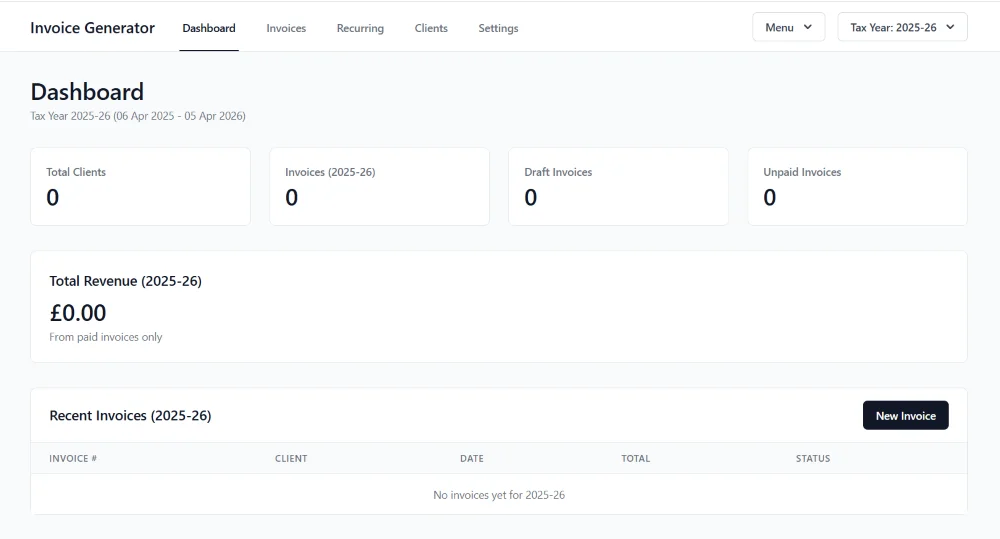
Invoice Generator is a free, open source Django app that runs on your own Windows computer. You double-click start.bat, open the address it shows in your browser, and your clients, invoices and bank details stay in a data folder on your computer behind a login. Desk Ledger and Pipeline take it one step further by packaging the app as a Windows program, so the user unzips a folder and double-clicks one file without installing Python.
Forms, Templates and Admin Without the Cloud
One of Django's underrated strengths in offline-first work is its built-in admin interface. For personal or small-scale tools the admin can act as a complete backend, a data management screen and a configuration panel in one, and combined with custom templates and forms it lets you deliver real functionality without a heavy front-end framework or any outside service. Offline-first work often benefits from less abstraction, not more.
If you want the admin to look more current, Adminita is a free Django admin theme that changes only how the admin looks, and it keeps the admin working as before.
Data Portability and Export
Offline-first does not mean data isolation, and in fact the opposite is true. A well-designed offline-first Django app should make it easy to export data to CSV or JSON, back up the database file, move data between versions and look at records without special tools. Because SQLite keeps everything in a single file, users get a level of transparency that cloud systems rarely offer, and that builds the trust that makes long-term use realistic.
Two Practical Tasks
Strip a Django app back to offline-first
- Disable all outbound network callsIf something breaks, you have found a hidden dependency.
- Remove analytics, webhooks and third-party APIsKeep only what the app needs to do its own job.
- Switch the database to SQLiteOne file that is easy to back up.
- Serve all assets locallyFonts, scripts and stylesheets should come from your own files.
- Run the app with no internet connectionIf it still works as expected, you are already close to offline-first.
Design one feature offline-first from the start
- Which feature will you design first?Pick one that would be useful to a single person on a single computer.
- What data does it need, and how does it live on the device with no accounts and no external services?
- How will the user back it up themselves?Explicit, user-controlled backups are part of the design.
Designing a feature with these constraints from the outset often leads to clearer logic, better data models and more resilient software than retrofitting offline support later.
The Real Trade-Offs
Offline-first Django apps do have limits, and they are not ideal for real-time collaboration, very large numbers of simultaneous users or live data feeds. Most personal, creative and administrative tools do not need those features, though, and offline-first design forces clarity while Django provides the structure, so the two together produce software that is stable, understandable and durable.
Using Django this way is not a workaround but a deliberate choice, because it treats software as something that should last, stay usable and respect the user's ownership. In a landscape of temporary platforms and rented access, Django's dependable, unexciting reliability is an asset, and for offline-first software that is usually exactly what you want.
- Django's database layer, admin, forms and login all work without the internet, so it suits local applications well.
- SQLite gives an offline-first app one stable file that the user can back up and move.
- Hidden network calls are the most common way an offline-first app breaks, so test by running it with no connection.
- Offline-first Django fits personal and small-scale tools, not real-time collaboration or very large audiences.
Interactive Content Blocks
The stats bar, checklist and writing box on this page are interactive content blocks, and you can add the same eight blocks to your own articles, guides and sales pages. Your AI assistant writes them from one skill file, and your readers' progress is saved on their own device.
See Interactive Content Blocks →What Is Offline-First Software?
A clear definition, and how it differs from works offline.
Read more →When Offline-First Is the Right Choice
How to tell whether a project suits offline-first design.
Read more →Understanding Local-First Sync
What changes when your data needs to reach more than one device.
Read more →