On 24 November Claude scanned four of my sites for images with random file names. I had named four sites, so it checked four. In the last paragraph of its report it mentioned that other sites exist and it had not looked at them. I asked why that came at the end, after the work was done. Its answer was plain: nothing in my rules told it to state the scope first, so it had used my list as the scope and told me afterwards. We wrote the rule down. It went into what I call my brain.
- My brain is a folder of written rules and notes on my own computer. Claude Code reads its main file at the start of every session.
- The main file is a map. It points Claude to the other files when a task needs them.
- My rules are dated, so I can see how old they are, and many say why they exist.
- Many of the rules came from something going wrong. Five of them came from one image mistake.
- A rule is only text. It helps if Claude follows it, and I do not know yet how well that works.
- You can start with a file of five lines in your own project folder.
What the brain is
It is a folder on my computer with three parts (plain text files, nothing clever):
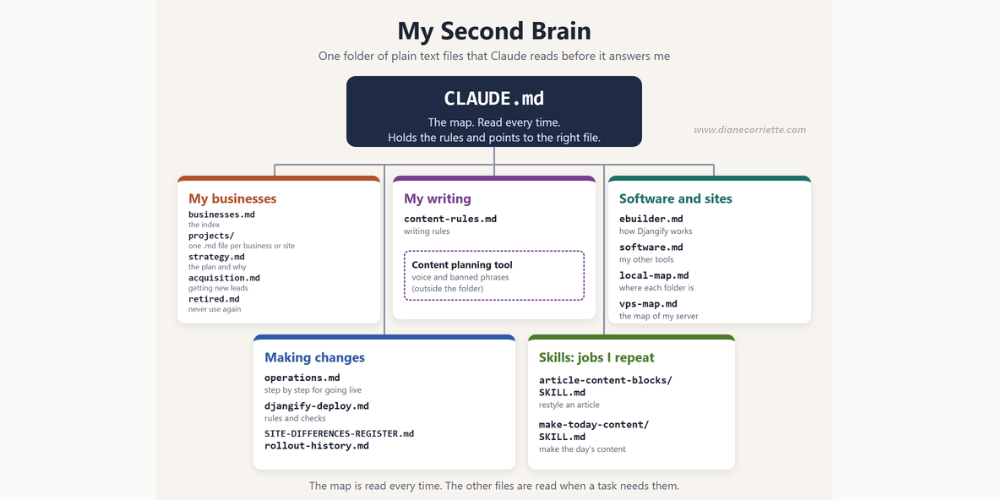
- One main file called CLAUDE.md. It holds the rules that are always true and points to everything else.
- A knowledge folder with reference notes: what each of my businesses sells, how I deploy my sites, where everything lives and the writing rules that apply to each site.
- A skills folder with the how-to for jobs I repeat, so Claude does not work out the steps again each time.
Claude Code reads a file called CLAUDE.md at the start of every session. The one in my main settings holds only a pointer to the brain folder, and nothing else is allowed in it. Every rule lives in one place.
What is in it, file by file
The files you will see named here end in .md, which stands for Markdown. It is plain text, so you can open it in Notepad.
CLAUDE.md is the map. Claude reads it every time and opens the other files when the job in front of it needs them.
My businesses
- businesses.md is the index.
- A projects folder has one file for each business or site, saying what it is and who it is for. They used to share one file, which got so long that I split it.
- strategy.md says what I am doing across all of them and why.
- acquisition.md is my plan for getting new leads for Djangify.
- retired.md lists old stories, claims and names that must never be used again.
My writing
content-rules.md holds writing rules. My voice and my banned phrases live in my content planning tool, which Claude checks before it writes, so this file only carries what the tool does not.
My software and sites
- ebuilder.md explains Djangify.
- software.md covers my other tools.
- local-map.md says where each folder is.
- vps-map.md is the map of my server.
Making changes
- operations.md is the step by step for putting changes live.
- djangify-deploy.md holds the rules and checks that go with it.
- SITE-DIFFERENCES-REGISTER.md records how each of my sites differs from the others, so an update does not wipe a change.
- rollout-history.md records what was added and when.
Skills
Each skill has its own folder with a file called SKILL.md inside. One of mine restyles an article on one of my sites. Another takes the day's tasks from my content calendar and makes the content.
Why I built it
Claude does not remember one session when the next one starts. I do not remember everything I have told it either. One of us has to write it down, and a folder of files is more reliable than my memory. When I have forgotten something I said three weeks ago, the brain has not.
I built the current version on 13 November 2026. Every rule in it was reviewed with me one item at a time, and nothing was copied across without my say-so.
The rules that matter most
Each rule carries the date I set it and the reason. Here are the ones I would keep if I could only keep a few:
- Look first, then reply. Claude reads the code and the live site before it answers, and never asks me something it could have read. Why: it once planned a lead capture feature without reading the builder and told me my demo captured nobody. Every one of my sites has a built-in subscribers list.
- Never answer without facts. Anything it says about how a feature works has to come from something it read in that session. Why: I asked what it would take to turn a free giveaway into a free product, and it gave me a list of problems after a partial read, including a button problem it had made up.
- Stop and ask when reality does not match what I said. If a file, a tool or a number is not as I described it, it stops and tells me in a few lines instead of working around it.
- Commit only after it works, and only when I say yes. Claude does not commit or push code until the change is confirmed working. For a small change that has been checked, I can tell it not to wait.
- Date every rule and say why. A rule with no date cannot be checked, and a rule with no reason gets argued with later.
- Keep the brain short. Only rules, decisions with the reason, traps, retired items and pointers go in. If Claude could find something out by looking at the code or the live site, it does not go in.
What I added after the image mistake
For months, every image I added in the editor on my Djangify sites was saved under a random name instead of the one I gave it. I wrote the whole story in Why My Image File Names Were Random for Months and What I Changed. The part that belongs here is the rules it produced:
- The scope of a job comes from where the code or data actually lives, not from the names I give.
- Before any job with more than one step, and before every deploy, Claude says what it will cover and what it is leaving out.
- Anything it finds mid-job that changes what is being shipped is said before the deploy, so I never have to deploy twice.
- A feature that saves files or creates public addresses is compared with the nearest existing feature, and tested by reading back what was saved.
- A second version of something that exists, such as a theme, gets a list of everything the original does, ticked off item by item.
The fourth and fifth come from the same kind of gap: a new version of something that was never checked against the old one. My themes had it too. Spotlight did not carry my Search Console ID because nobody checked it against Classic.
Does it work?
I do not know yet. A rule is text in a file. Claude has to read it and follow it, and it has not always done what it was told. The first real test is the next job where I name three sites and mean all of them. If it covers all of them and tells me first, the rule is working. If it does not, I will find out the same way I found out about the images, and I will write it up.
Start your own
Your brain folder will look different from mine, because your work is different. Before you ask an AI to write any rules, decide what you want it to know. Work through the three steps below. It takes a few minutes, and you finish with a first file built around your own projects.
Step 1: What is your brain mostly for?
Pick the one closest to you. Each choice gives you five starter lines.
Running a business
Think about what you sell, who it is for and which decisions stay with you.
1. Before any job with more than one step, tell me what you will cover and what you are leaving out, and why.
2. Never invent a price, a figure, a customer or a result. Ask me.
3. Ask me before you send, publish, delete or spend anything.
4. When what I told you does not match what you find, stop and tell me.
5. Date every rule you add and write one line on why it exists.
Writing and content
Think about how you sound, the stories you tell and the phrases you never want to read in a draft.
1. Read my writing rules and a sample of my writing before you draft anything.
2. Use only the stories and facts I have given you. If one is missing, ask me.
3. Keep a list of words and phrases I never want to see, and check every draft against it.
4. Save everything as a draft. I decide what gets published.
5. Date every rule you add and write one line on why it exists.
Building software
Think about where your code lives, how a change goes live and what has broken before.
1. Before any job with more than one step, tell me what you will cover and what you are leaving out, and why.
2. If you find something part way through that changes what you are about to ship, tell me before you ship it.
3. When you build a second version of something, list everything the original does and check each item.
4. Do not tell me how something works unless you read the code in this session.
5. Date every rule you add and write one line on why it exists.
Step 2: Say what you want it to know
Short answers are fine. They save in this browser on this device, and nothing is sent to me.
My brain folder plan
- Which projects do you want your brain to cover?A business, a book, a site, a course, a job. One line each.
- What do you keep explaining to your AI again and again?These are your first notes.
- Which facts must it get right about you and your work?What you offer, who it is for, where your files are.
- What did it get wrong last time?These are your first rules. Say what happened.
- What should it always ask you before doing?
- What should it never do or say?Include old names, old offers and words you dislike.
Step 3: Turn your answers into your first file
- Copy the prompt belowPaste it into Claude Code in your project folder.
- Copy your answersUse the Copy my answers button in step 2 and paste them under the prompt.
- Add your starter linesPaste the five lines you chose in step 1 at the end.
I want to build a brain folder: a main file called CLAUDE.md that holds the rules that are always true and points to a knowledge folder of reference notes.

Below are my answers to some planning questions, followed by five starter rules.

First, tell me what is unclear or missing, and ask me about it one question at a time. Then draft CLAUDE.md using only what I have told you. Keep it short. Date every rule and add one line on why it exists. List the other files you suggest, with one line on what goes in each, and wait for my yes before you create anything. Where you do not know something, ask me instead of filling the gap.

My answers and starter rules:
If your AI assistant cannot create files, ask it for the text and save it yourself as CLAUDE.md. Claude Code reads that file at the start of every session.
Then add one rule every time Claude surprises you, with the date and the reason. Create the file now, while you remember what went wrong last time.
If you are building with AI as a one-person business, Building With AI as a One-Person Business collects what I have learned about what to hand over and what to keep.
- My brain is a folder of dated rules and notes that Claude Code uses, so it carries what I forget.
- CLAUDE.md is the map, and the other files cover my businesses, writing, software, changes and repeat jobs.
- The rules that matter most are about reading before answering, stopping when reality differs, and never committing without a yes.
- The image mistake added five rules about scope, side effects and checking a new version against the old one.
- A rule only helps if it is followed, so I am watching whether these ones are.
- To start your own, pick what your brain is for, answer the questions and have your AI draft the first file.