I keep seeing the same things on Instagram. Someone says they edited a video with Claude, or designed a carousel they can change directly, or made a mod for Claude Code. Every post makes it sound like something I should already know. So I went to Anthropic's own pages to find out what each one really is, instead of trusting other people's summaries.
Everything below about mods and the mobile app comes from Anthropic's own pages, which are linked at the end, and so does most of what I say about Claude Design. I have not made or installed a mod myself yet. I have used Claude Design for slides and an animated video, but not for a carousel. Features change quickly, so check the date on each page.
- A mod is a small TypeScript function that changes how Claude Code works. Anthropic announced them on October 1, 2026.
- You can ask Claude Code to write, install and reload one for you.
- Mods are not sandboxed. Only install ones from sources you trust.
- Claude Design lets you edit directly on a canvas. Anthropic's pages do not mention carousels.
- I have used Claude Design for slides and an animated video, but not for a carousel.
- Carousel tools I saw online come from third parties, not from Anthropic.
- From your phone you can reach cloud sessions, a session on your own computer, or the desktop app. Which one you pick decides whether your computer has to stay on.
What a mod is
Anthropic describes mods as small TypeScript functions that change how Claude Code works. Each one attaches to an event, such as a tool call, a permission request or a screen update, and can run before it, after it or in place of it. A mod can rewrite a prompt before it reaches the model, block or rewrite a tool call, approve or deny permission requests, and remove secrets from tool output before Claude reads it. It can also change parts of the interface, add buttons and inputs, or replace built-in features such as the diff view.
Making one without coding
You can write a mod yourself or ask Claude Code to do it. Anthropic says Claude can write the TypeScript, install it and reload it inside your session. The Claude Code changelog also shows a built-in plugin-authoring skill, which handles sharing a mod. To share one with other people, you package it in a plugin and submit it to the Claude directory. People who receive it can install it from the directory, or with the /plugin command in the command line.
Anthropic's article says mods work in the Claude Code command line and the desktop app, and a mod can target either or both. It does not mention cloud sessions. The changelog also mentions mods in VS Code and in the desktop and mobile apps. If you plan to film one, test where it actually shows before you record.
Anthropic is clear that mods are not sandboxed and have the same access to your machine as Claude Code. Only install mods from sources you trust. On Team and Enterprise plans, a built-in security mod loads first and restricts risky behaviour.
Before you install a mod
Because a mod runs with the same access as Claude Code itself, it is worth a minute of checking. This is the order I would follow:
- Find out where it came from. Install only from the Claude directory or from someone you trust and can identify.
- Ask Claude Code to explain it. Paste the code in and ask what it reads, what it changes and whether it sends anything anywhere. Do this before you install, not after.
- Check what it hooks into. A mod that only changes how a button looks is a smaller risk than one that approves permission requests or rewrites tool calls.
- Try it somewhere harmless first. Use a test folder, not a project with client files or passwords in it.
- Know how to remove it. If you installed it as a plugin, you can manage it from the /plugin command in the command line.
The first point is Anthropic's own advice. The rest are my own suggestions for being careful, not from Anthropic's page.
Editing directly in Claude Design
Claude Design makes designs, interactive prototypes and one-pagers through chat. Claude builds the design on a canvas beside the conversation, and you refine it in three ways. You can drag, resize and align elements directly. You can click a part of the canvas and comment on it. Or you can ask in chat. Anthropic suggests direct edits for quick visual changes, comments for individual components and chat for bigger structural changes. Anthropic's page warns that comments can occasionally disappear, and suggests pasting the feedback into chat if that happens.
When you are done, you can export as a .zip file, a PDF, a PowerPoint file, Google Slides or standalone HTML. You can also hand the design to Claude Code.
It is on by default for Free, Pro, Max, Ultra, Team and Enterprise plans. Anthropic's support page says the standalone version at claude.ai/design closes on December 14, 2026, so check where it lives before you build a habit around it.
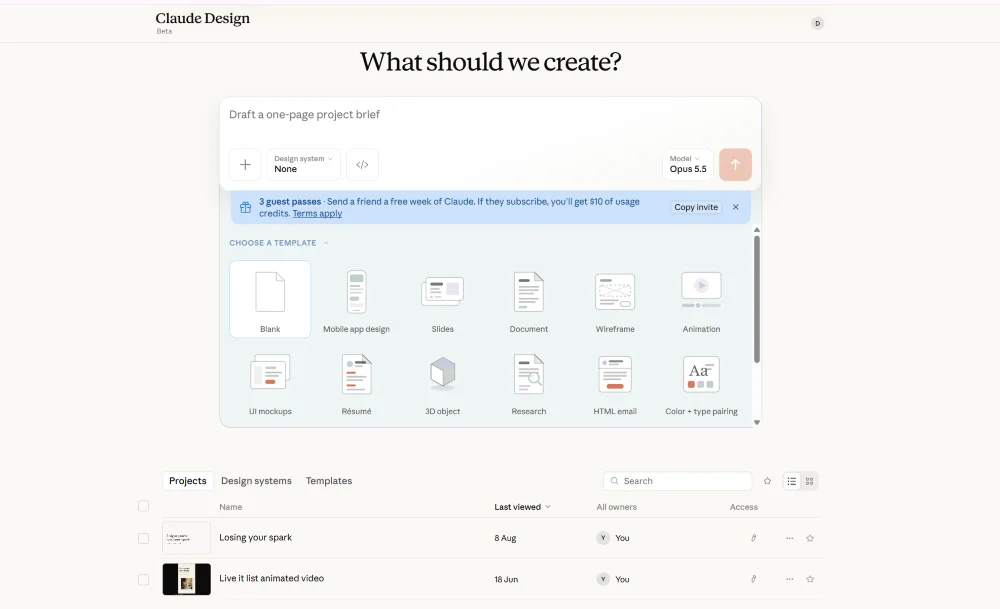
When I opened Claude Design on my own account, the start screen is labelled Beta and offers these templates: Blank, Mobile app design, Slides, Document, Wireframe, Animation, UI mockups, Résumé, 3D object, Research, HTML email, and Color + type pairing. The list scrolls, so there may be more below the ones I saw. I have used it for slides and for an animated video.
So where do the carousels come from?
This was the surprise. Anthropic's Claude Design pages mention one-pagers, prototypes, landing pages and slide decks, but not carousels or social posts. None of the templates I saw in Claude Design was a carousel either. Slides is the nearest, but I have not yet asked it for one. The carousel posts I saw online seem to use other tools alongside Claude. Two I found:
- Moda. A connector in the Claude directory that says it makes social posts and carousels with editable layers. It is made by a third party, not by Anthropic.
- Open Carrusel. An open source carousel builder that works with Claude Code. Also third party.
I have not tested either, so treat them as starting points to try, not recommendations.
Using Claude Code from your phone
I write much of this from my phone, so this part matters to me. Anthropic says Claude Code has no separate mobile app. The Claude app is a client for Claude Code sessions, and what you reach from it depends on where the work runs.
| Option | What you connect to | Does my computer need to stay on? |
|---|---|---|
| Cloud session | A session on Anthropic's cloud infrastructure, working on a repository on GitHub | No. It carries on after you put your phone away |
| Remote Control | A Claude Code session running on your own computer | Yes. Use it when the work needs your local files, tools or MCP servers |
| Dispatch | The desktop app on your computer | Yes. It needs a Pro or Max plan and is not available on Team or Enterprise |
A few limits are worth knowing. Cloud sessions and Remote Control need a claude.ai account, so they do not work with a Console API key or a provider such as Amazon Bedrock. Commands that only run in the terminal, such as /plugin and /resume, do not work from the app. You also cannot choose the Bypass permissions mode from the app.
I used this to fix, merge and deploy the news site without being at my desk.
Where I check for updates
Anthropic publishes official feeds for the Claude Code changelog and the Claude Platform release notes, and I am adding both to my news site. I could not find an official feed for Anthropic's news, blog or engineering pages. I looked at the pages and the usual feed addresses. The feeds I did find for those are made by other people, so I am not using them. For now I check those pages by hand.
Before you try one
- What is one small annoyance in Claude Code that a mod could remove?
- Do you need a carousel tool, or would Claude Design's one-pagers and slides do?
- Which official page will you check before you trust a claim from Instagram?
- Mods are small TypeScript functions that change how Claude Code works, and Claude can write them for you.
- They are not sandboxed, so only install ones you trust.
- Claude Design supports direct editing on a canvas, but Anthropic does not mention carousels.
- Carousel tools I found are third party and untested by me.
- On a phone, cloud sessions keep working without your computer. Remote Control and Dispatch need it on.
- Only the changelog and platform release notes have official feeds.
Read next
I Built My Own Markdown Editor With Claude Code in Under 10 Minutes
What a first small build with Claude Code looks like.
Read more →Sources
From Anthropic:
- Customize Claude Code with mods
- Claude Code changelog
- Claude Code on mobile
- Get started with Claude Design
- Claude Platform release notes
Third party, not tested by me: